


This is the execution checklist that sits under the 90-day Maps sprint. If you want the calendar and the strategy, use How to Rank in Google Maps: A Contractor's 90-Day Plan. This page is the step-by-step: claim, NAP, reviews, local proof, tracking. Fast here means doing the work in the right order, not a ranking overnight.
Step 1: Claim and complete the Google Business Profile
Search your business in Google Business Profile Manager. If a listing already exists, click Manage this business. Verify by phone when Google offers it. Postcard takes one to two weeks. Do not edit name, address, or category while verification is in flight.
Then complete every field. Business name must match the legal or DBA name on the door, not "Best HVAC Tampa." Hours, website, phone, and service areas must match the website and citations exactly. Specify cities you actually serve. Claiming half the state dilutes rank. Upload 10-15 real photos of team, vehicles, and completed jobs. Write a 750-character description in plain language. Set the primary category first (HVAC Contractor, Plumber, Roofer, Electrician, General Contractor), then honest secondary categories.
Post weekly. Seasonal services, completed jobs, hiring, and hours changes all count as activity. Google favors profiles that keep moving.
"Step-by-step Google Maps ranking for service businesses: claim the Google Business Profile, fix NAP citations, collect reviews, prove you work locally, and track a geogrid."
Step 2: Make NAP identical everywhere
Citations are mentions of name, address, and phone. Google uses them to verify the business is real. "123 Main St" in one directory and "123 Main Street" in another is a conflict. Pick one format for street, suite, city, and phone, then use it everywhere.
Start with high-authority listings: Google, Apple Business Connect (Apple Maps as a citation, not ads), Yelp as a review directory, Facebook, BBB, chamber, and the trade directories for HVAC, plumbing, roofing, electrical, or GC. Skip junk directories. Spreadsheet the exact string used in each field. Audit quarterly. Do not buy Yelp Ads as a lead offer. Do not budget for Apple Maps ads. They are retired.
NAP mistakes that undo a week of work
Tracking numbers on the Google Business Profile or on Yelp will split your identity. Keep the real local number on every citation. Suite vs Apt vs #. FL vs Florida. Parent company name vs DBA. Pick one string. The quarterly spreadsheet exists so a vendor or an office manager cannot quietly republish the old format.
Step 3: Collect reviews on a cadence
Reviews are the strongest Map Pack signal you control. Ask on-site the day the job closes. Text a direct review link within the hour. Respond to every review within a week. Never buy reviews. Detailed reviews that name the service and the tech help more than "great job" one-liners.
Step 4: Prove you work there
Google ranks businesses it can verify are local. A page per city you serve, with jobs completed there, real photos, and local detail. Post completed projects to the profile weekly. Earn local links from suppliers, chambers, and sponsorships. Every artifact is evidence: this business really works here.
Step 5: Track a geogrid, not your own phone
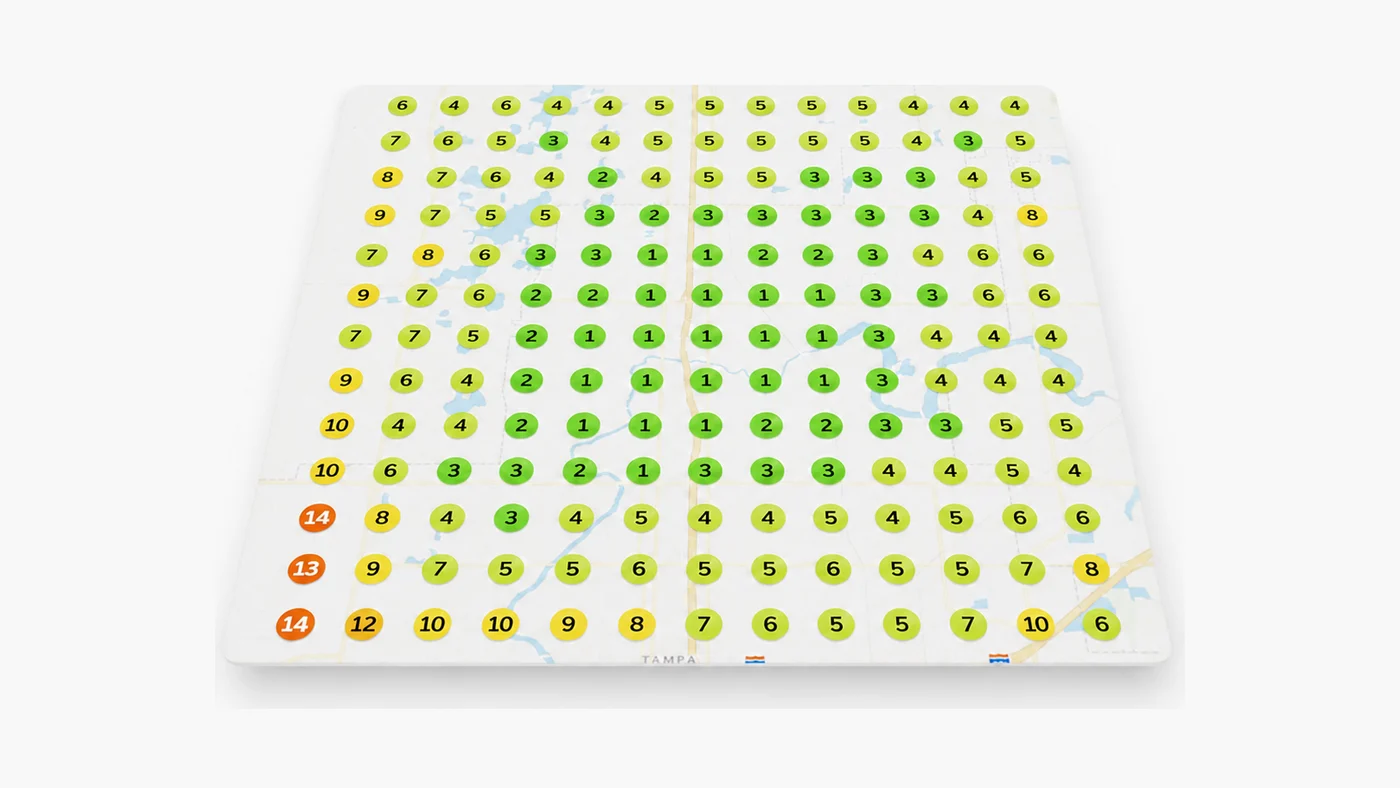
Track Map Pack position from dozens of points across the service area, monthly. Personalization inflates the view from your office. Pair the grid with profile insights (calls, direction requests, website taps) and tracked organic calls. Movement plus calls means it works. Movement without calls means fix conversion: photos, categories, hours, click-to-call.
Done for you: SEO campaigns at $3,000 per month with a 90-day Top-3 Map Pack target and geogrid proof. If we miss the target, we keep working. Baseline first: the $1,000 Growth Audit. Or book a strategy call at (813) 669-7572.
Frequently Asked Questions
How fast can a service business rank on Google Maps?
Verification can finish in a day. Ranking in the Map Pack for category searches takes consistent profile work, reviews, and citations. Treat 90 days as a target for Top-3 once foundations are fixed, not a promise.
Does Apple Maps help Google Maps rankings?
A consistent Apple Business Connect listing is a citation, same idea as Yelp or BBB. It is not an ads product you need to buy.
How many reviews do I need?
Enough recent, real reviews to look active next to the shops already in the pack. Velocity matters more than a one-time burst. Keep asking every closed job.
Get a real diagnosis of your business.
A seven-layer review of your SEO, Google Ads, website, and Map Pack presence, delivered as a written report within 72 hours. It's $1,000 and it always credits toward any work you do with us. If we don't find $100,000 in missed revenue, we refund it.
Get the Growth Audit